Amplifier
The Amplifier in Massive XL controls the level, panning, and feedback before the Effects.
The Amp (Amplifier) is the final module in the signal path of the voice. It controls the level and panning before the Effects. Level can be used to adjust the signal level going into the Effects and is always controlled by the Amp Envelope (Env 1). Pan is used to place the sound in the stereo image, and can be modulated for creative panning effects.
The additional Feedback control adjusts the level of the signal sent into the voice's feedback loop. The feedback loop can be freely connected in the Polyphonic Area of the Routing page and can be used to create organic, chaotic, and distorted sounds as well as physical modeling patches. You can find more information in Feedback loop.
Note
Editing the Amplifier module is not available in Massive XL Player.
Amplifier module overview
The Amplifier module contains the following options and controls:
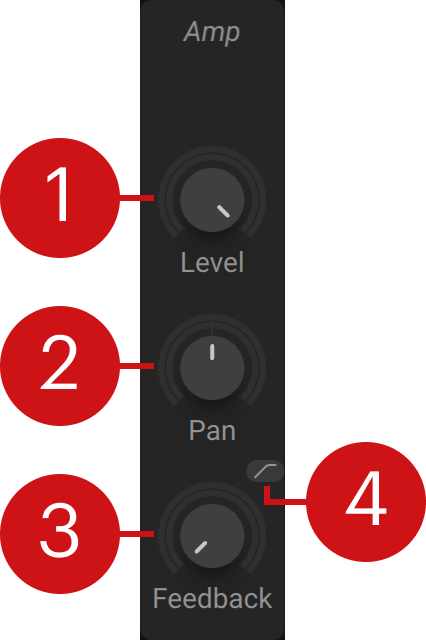 |
Level: Adjusts the output level of the amplifier.
Pan: Adjusts the position of the sound in the stereo image by panning the signal from left to right.
Feedback: Adjusts the level of the signal going into the feedback loop, controlling the chaotic behavior and distortion produced by the feedback. You can find more information in Feedback loop.
High-pass: Activates a high-pass filter that cuts low-frequency content in the feedback loop. You can use it to avoid overloading the feedback loop with excessive bass.