Pitch
The Pitch section lets you set the global oscillator tuning and glide, or portamento. The settings apply to all voices in the same way. You can transpose all oscillators relative to the MIDI notes you are playing, or modulate pitch and glide globally.
Pitch contains the following options and controls:
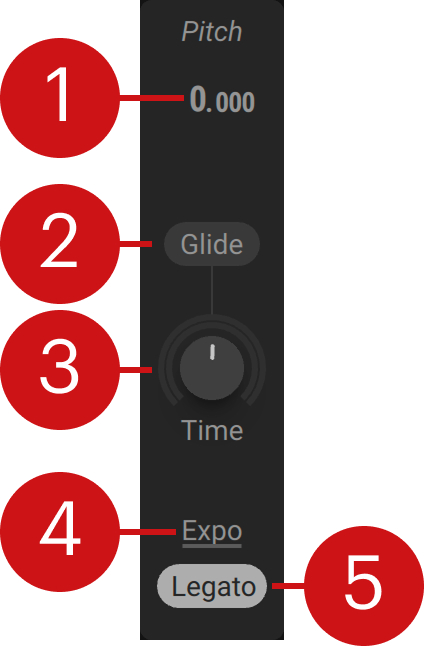 |
Pitch: Adjusts the tuning of all oscillators in semitones and cents.
Glide: Activates glide, or portamento, making the pitch slide from one note to the other.
Time: Adjusts the glide time, which is the time it takes the pitch to slide from one note to the other. When turned fully to the left, pitch will change instantly. Turning the control to the right will create increasingly smooth pitch transitions.
Glide Shape: Selects the glide shape. Exponential produces the equivalent of a 1-pole low-pass filter curve, making it the best choice for classic glide. Linear creates a straight, even transition. Inverse Exp flips the characteristics of the 1-pole low-pass filter curve.
Legato: Activates legato behavior for the glide, making pitch slide from one note to the other only when playing two or more notes at the same time. When Legato is deactivated, glide will be applied to every note you play.
Note
Additional settings for monophonic glide are available under Polyphony on the Voice page.