Filter
The Filter module in Massive XL offers nine different types of filters, each with their own distinct sound and features.
The Filter module is a key element in Massive XL's polyphonic voice structure. It offers nine different types of filters, each with their own distinct sound and features. You can use filters to balance and correct the tone of a sound, to sculpt complex timbres from raw waveforms, and to transform sounds beyond recognition.
Filters can also be used as sound generators by increasing the resonance for self-oscillation, and by using the Exciter envelope or noise signals for resonator and physical modeling patches.
Tip
The Filter module can be freely placed in the signal flow on the Routing page. You can find more information in Generators and processors.
Note
Editing the Filter module is not available in Massive XL Player.
Filter module overview
The Filter module consists of the following elements:
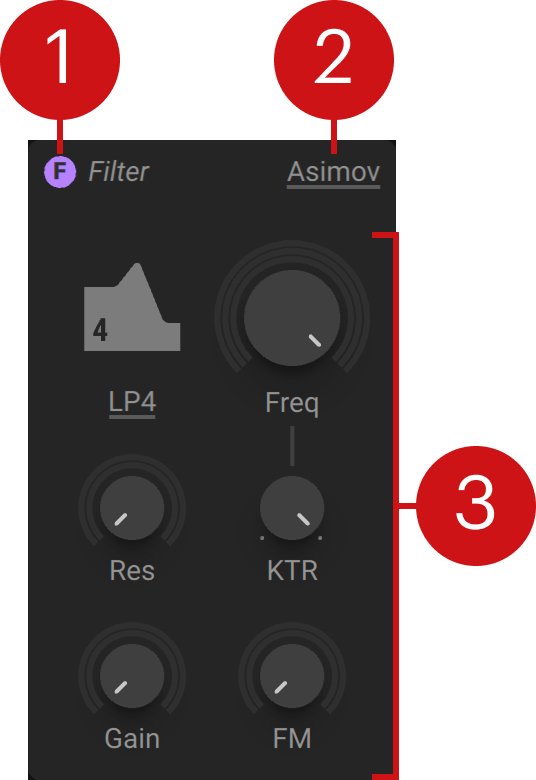 |
Filter on/off: Switches the Filter module on or off, bypassing its processing. The icon can also be found in the Filter module on the Routing page.
Filter menu: Selects the filter type and lets you access sub-presets.
Filter controls: Each filter type has a different set of controls specific to its character and features.
Asimov
This low-pass filter is inspired by a classic bass synthesizer from the 80s. It provides a huge sweet-spot for resonant filter sounds due to the lack of self-oscillation. It features high-pass filtering in the feedback path for a controlled bass response. Its squelchy sound makes it suitable for acid bass lines and works well with distortion.
Asimov contains the following controls and options:
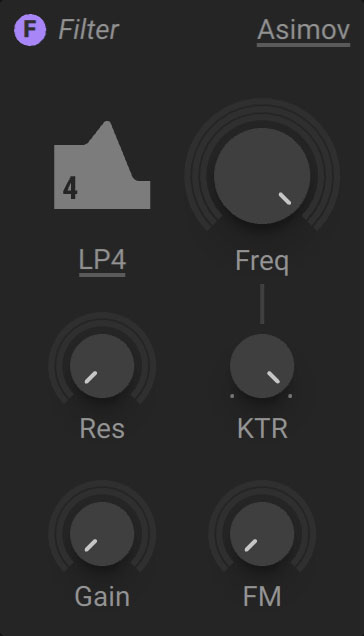 |
Filter mode: Selects the filter mode that determines the steepness of the low-pass filter. LP1 (low-pass 1-pole) has a slope of 6 dB/Oct, LP2 (low-pass 2-pole) has a slope of 12 dB/Oct, and LP4 (low-pass 4-pole) has a slope of 24 dB/Oct.
Freq: Adjusts the cutoff frequency of the low-pass filter. Frequency content above the cutoff frequency is attenuated, creating a darker sound.
Res: Adjusts the resonance amount of the low-pass filter. Turning Res to the right increases the resonance, causing the frequency content at the cutoff frequency to become more pronounced.
KTR: Adjusts the amount of key tracking, which is the degree to which the filter's cutoff frequency follows the MIDI pitch.
Gain: Adjusts the input level and increases the amount of saturation applied to the signal.
FM: Adjusts the amount of audio rate modulation applied to the filter frequency, also called filter FM (frequency modulation). The FM source needs to be connected to the FM bus on the Routing page, otherwise the FM control will not have an effect.
Blue Monark
Blue Monark is a polyphonic adaptation of the Monark multi-mode filter. Its characteristic saturation sound can be achieved by driving the filter using the Gain control. It offers audio-rate modulation and is capable of self-oscillation. The filter has a warm and fat character that makes it suitable for overdriven bass sounds as well as classic leads.
Blue Monark contains the following controls and options:
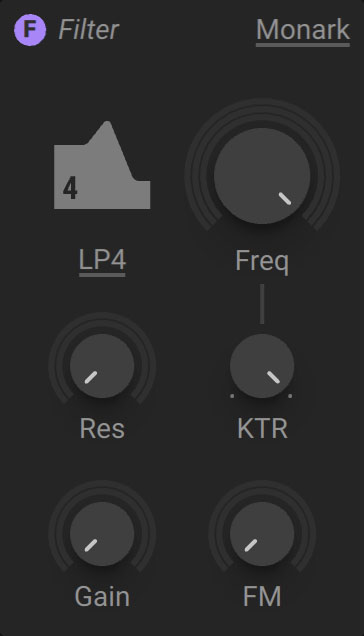 |
Filter mode: Selects the filter mode. LP (low-pass) attenuates frequencies above the cutoff, with slopes of 6 dB/Oct (LP1), 12 dB/Oct (LP2), 24 dB/Oct (LP4). BP (band-pass) attenuates frequencies above and below the cutoff. Peak adds a resonant peak. HP (high-pass) attenuates frequencies below the cutoff. Dual Notch produces two narrow notches around the cutoff.
Freq: Adjusts the cutoff frequency of the filter. The effect of this control on the sound depends on the selected filter mode.
Res: Adjusts the resonance amount of the low-pass filter. Turning Res to the right increases the resonance, causing the frequency content at the cutoff frequency to become more pronounced.
KTR: Adjusts the amount of key tracking, which is the degree to which the filter's cutoff frequency follows the MIDI pitch.
Gain: Adjusts the input level and increases the amount of saturation applied to the signal.
FM: Adjusts the amount of audio rate modulation applied to the filter frequency, also called filter FM (frequency modulation). The FM source needs to be connected to the FM bus on the Routing page, otherwise the FM control will not have an effect.
Comb
The Comb filter delays and feeds back the input signal. Unlike echo effects it is optimized for very short delay times, causing interferences in the audible range. It creates peaks and troughs in the frequency response, which get more pronounced as feedback is increased. Comb can be used as a tuned resonator, a complex filter, or to create flanging effects.
Comb contains the following controls and options:
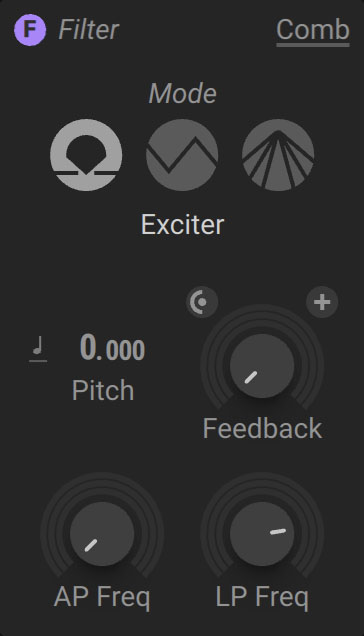 |
Filter mode: Selects one of three modes, Exciter, OSC, or Flanger. Exciter is suitable for physical modeling when combined with the Exciter envelope or Noise. OSC is suitable for oscillator signals to create complex filtering effects. It compensates for resonances caused by the harmonics of the signal. Flanger is suitable for flanging effects.
Pitch mode: Selects one of three pitch tracking modes, Key Track, Fix, Ratio. Key Track locks the pitch to MIDI. Fix sets an independent, fixed pitch in MIDI note numbers, defaulting to 60 (middle C). Ratio multiplies or divides MIDI pitch. For example, a ratio of 3 multiplies the pitch by 3, producing the 3rd harmonic.
Pitch: Adjusts the tuning of the Comb in semitones and cents. Applying modulation produces vibrato and arpeggio effects. In technical terms, Pitch changes the size of the delay buffer inside the Comb. Larger delay buffers increase the delay time, resulting in a lower filter frequency. Smaller delay buffers decrease the delay time, resulting in a higher filter frequency.
Feedback routing: Switches between two different output taps. When off, the output is tapped after the delay. When on, the output is tapped before the delay. This setting only takes effect in combination with specific routings, for example when using the FB modules for external feedback around the Comb, or when mixing its output signal with the input signal as part of a parallel routing.
Feedback polarity: Switches between positive and negative polarity for the feedback signal. With positive feedback polarity the Comb filter produces all harmonics, while with negative feedback polarity it produces only odd harmonics.
Feedback: Sets the level of the internal feedback loop of the Comb. Higher settings increase the feedback level, resulting in a stronger resonance of the filter.
AP Freq: Adjusts the frequency of an all-pass filter in the Comb's feedback path. By changing the all-pass filter frequency, you can use the Comb to produce inharmonic spectra.
LP Freq: Controls the cutoff frequency of a low-pass filter in the feedback path. Decreasing the low-pass filter frequency attenuates the high-frequency content of the feedback signal, resulting in a dampened sound.
Creak
Creak is an experimental filter that produces strong resonances and distinct non-linear behavior. Combined with the feedback loop on the Routing page, you can apply heavy distortion and spectral transformation to a sound. The filter has an aggressive and wild character.
Creak contains the following controls and options:
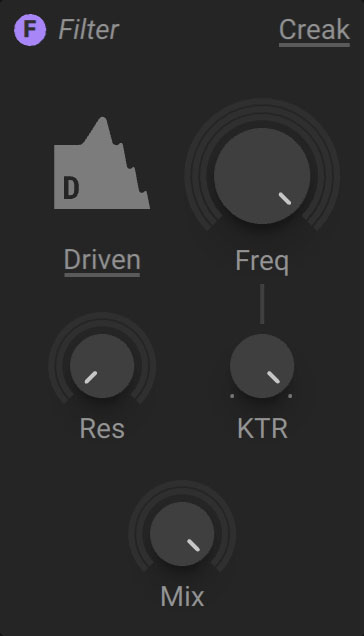 |
Filter mode: Selects the filter mode. Driven and Gnarl produce different sets of harmonically spaced resonances similar to a flanger, Nosy produces formants with a nasal quality, and Euer produces formants with a vocal quality.
Freq: Adjusts the frequency of the filter. Unlike a typical cutoff control, it shifts the resonances across the frequency spectrum without attenuating broad frequency bands.
Res: Adjusts the intensity of the resonances in the frequency spectrum produced by the filter.
KTR: Adjusts the amount of key tracking, which is the degree to which the filter's frequency follows the MIDI pitch.
Mix: Blends between the input signal and the filtered signal.
Groian
Groian is a hybrid between a filter and a flanger. It features a feedback delay in the filter's resonance path, producing strong resonances on top of the basic filter response. Self-oscillation is possible, however it becomes unstable towards lower frequencies. The filter has a highly resonant character that lends itself to vocal and metallic sounds.
Groian contains the following controls and options:
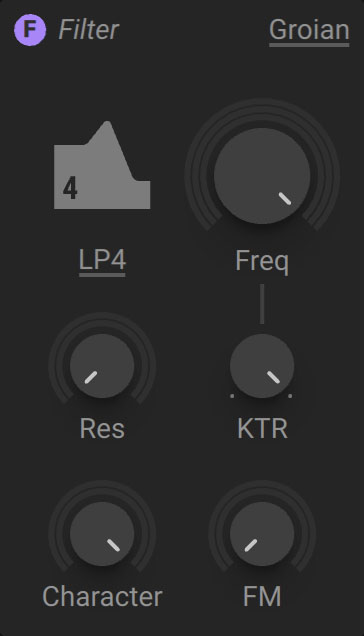 |
Filter mode: Selects the filter mode. LP4 (low-pass 4-pole) mode attenuates frequencies above the cutoff with a slope of 24 dB/Oct. BP (band-pass) attenuates frequencies above and below the cutoff. Peak adds a resonant filter peak at the cutoff. HP (high-pass) attenuates frequencies below the cutoff.
Freq: Adjusts the cutoff frequency of the filter. The effect of this control on the sound depends on the selected filter mode.
Res: Adjusts the resonance amount of the low-pass filter. Turning Res to the right increases the resonance, causing the frequency content at the cutoff frequency to become more pronounced.
KTR: Adjusts the amount of key tracking, which is the degree to which the filter's frequency follows the MIDI pitch.
Character: Adjusts the intensity of the additional resonances in the frequency spectrum produced by the delay in the resonance path.
FM: Adjusts the amount of audio rate modulation applied to the filter frequency, also called filter FM (frequency modulation). The FM source needs to be connected to the FM bus on the Routing page, otherwise the FM control will not have an effect.
Tip
The behavior of the filter is sensitive to the level of the input signal with stronger self-oscillation at lower input levels.
Scanner
This multi-mode filter is inspired by the raw sound of analog monophonic synthesizers from the 80s. It has a strong and colorful resonance, which you can use to carve out the harmonics of a signal when doing filter sweeps. The filter has a dirty character that makes it suitable for adding texture and character to stacked pads and leads.
Scanner contains the following controls and options:
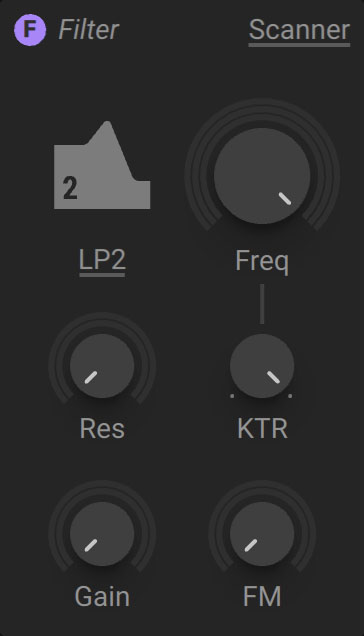 |
Filter mode: Selects one of four filter modes. Two low-pass modes attenuate frequencies above the cutoff, LP1 (low-pass 1-pole) with a slope of 6 dB/Oct and LP2 (low-pass 2-pole) with a slope of 12 dB/Oct. BP2 (band-pass 2-pole) attenuates frequencies above and below the cutoff with a slope of 12 dB/Oct. Peak mode adds a resonant filter peak at the cutoff.
Freq: Adjusts the cutoff frequency of the filter. The effect of this control on the sound depends on the selected filter mode.
Res: Adjusts the resonance amount of the low-pass filter. Turning Res to the right increases the resonance, causing the frequency content at the cutoff frequency to become more pronounced.
KTR: Adjusts the amount of key tracking, which is the degree to which the filter's frequency follows the MIDI pitch.
Gain: Adjusts the input level and increases the amount of saturation applied to the signal.
FM: Adjusts the amount of audio rate modulation applied to the filter frequency, also called filter FM (frequency modulation). The FM source needs to be connected to the FM bus on the Routing page, otherwise the FM control will not have an effect.
Tip
The behavior of the filter is sensitive to the level of the input signal with stronger self-oscillation at lower input levels.
SVF
This multi-mode filter is based on the popular state-variable filter topology and serves as a tool for a wide range of filtering tasks. Its defining characteristic is the controlled behavior and universal applicability. The filter has a clean character that makes it suitable for any sound that requires tonal shaping without adding color or distortion.
SVF contains the following controls and options:
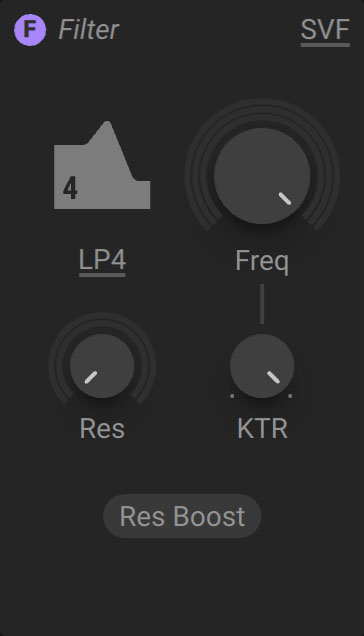 |
Filter mode: Selects the filter mode. LP (low-pass) attenuates frequencies above the cutoff, with slopes of 12 dB/Oct (LP2) and 24 dB/Oct (LP4). BP (band-pass) attenuates frequencies above and below the cutoff. Peak adds a resonant peak. HP (high-pass) attenuates frequencies below the cutoff.
Freq: Adjusts the cutoff frequency of the filter. The effect of this control on the sound depends on the selected filter mode.
Res: Adjusts the resonance amount of the low-pass filter. Turning Res to the right increases the resonance, causing the frequency content at the cutoff frequency to become more pronounced.
KTR: Adjusts the amount of key tracking, which is the degree to which the filter's cutoff frequency follows the MIDI pitch.
Res Boost: Increases the range of the Res control to allow for a stronger resonance.
Tip
You can use the Exciter envelope via the Modulation modules on the Routing page to briefly trigger self-oscillation of the SVF at high Res settings. This so called filter pinging produces a damped sine wave that can be played via MIDI by using key tracking (KTR).
SVF Parallel
This flexible dual multi-mode filter is based on the state-variable filter topology. Its two filters are arranged in parallel. It has a clean character that makes it suitable for any sound that requires tonal shaping without adding color or distortion. The dual configuration allows for producing vocal formants as well as complex wobble sounds.
SVF Parallel contains the following controls and options:
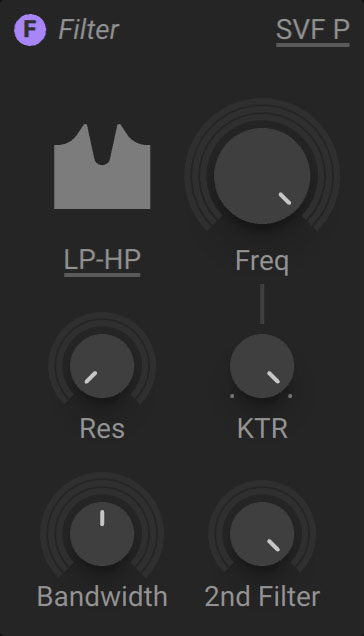 |
Filter mode: Selects one of seven modes that combine different responses of each of the two parallel filters. Six combinations of a 12 dB/Oct LP (low-pass) filter, a 12 dB/Oct HP (high-pass) filter, and a 6 dB/Oct BP (band-pass) filter are available, as well as the special Plateau mode.
Freq: Adjusts the cutoff frequencies of the two parallel filters. Both cutoff frequencies are offset by the same amount. Their relative position in the frequency position is set with the Bandwidth control.
Res: Adjusts the resonance amount of the low-pass filter. Turning Res to the right increases the resonance, causing the frequency content at the cutoff frequencies to become more pronounced.
Bandwidth: Spreads the cutoff of the two parallel filters in the frequency spectrum. At minimum setting, both filters share the same cutoff, which makes the resonance more pronounced. As Bandwidth is increased, the cutoff of one filter moves down in frequency, while the other moves up, letting you distribute the filter resonances to create formant frequencies.
KTR: Adjusts the amount of key tracking, which is the degree to which the filter's cutoff frequency follows the MIDI pitch.
2nd Filter: Blends between single and dual configurations of the filter by mixing in the second filter and adjusting the amount of frequency spread introduced by the Bandwidth control.
Tip
You can use the Exciter envelope via the Modulation modules on the Routing page to briefly trigger self-oscillation of the SVF Parallel at high Res settings. This so called filter pinging produces damped sine waves that can be played via MIDI by using key tracking (KTR).
SVF Serial
This flexible dual multi-mode filter is based on the state-variable filter topology. A high-pass and a low-pass filter are arranged in series. It has a clean character that makes it suitable for any sound that requires tonal shaping without adding color or distortion.
SVF Serial contains the following controls and options:
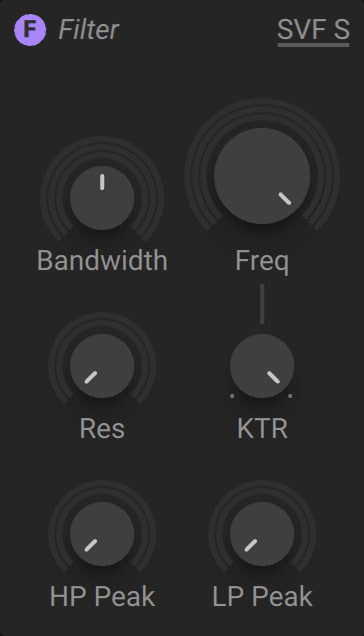 |
Bandwidth: Spreads the cutoff frequencies of the two serial filters in the frequency spectrum. At minimum setting, both filters share the same cutoff frequency. As Bandwidth is increased, the high-pass filter's cutoff moves down in frequency, while the low-pass filter's cutoff moves up. This way you can distribute the filter resonances to create formant frequencies.
Freq: Adjusts the cutoff frequencies of the two serial filters. Both cutoff frequencies are offset by the same amount. Their relative position in the frequency position is set with the Bandwidth control.
Res: Adjusts the resonance amount of the low-pass filter. Turning Res to the right increases the resonance, causing the frequency content at the cutoff frequencies to become more pronounced.
KTR: Adjusts the amount of key tracking, which is the degree to which the filter's cutoff frequency follows the MIDI pitch.
HP Peak: Gradually turns the high-pass filter into a peak filter (a band-pass filter mixed with the input signal) with only a resonant peak but no filter slope. This way you can add formant frequencies without filtering out the rest of a signal.
LP Peak: Gradually turns the low-pass filter into a peak filter (a band-pass filter mixed with the input signal) with only a resonant peak but no filter slope. This way you can add formant frequencies without filtering out the rest of a signal.
Tip
You can use the Exciter envelope via the Modulation modules on the Routing page to briefly trigger self-oscillation of the SVF Serial at high Res settings. This so called filter pinging produces damped sine waves that can be played via MIDI by using key tracking (KTR).